





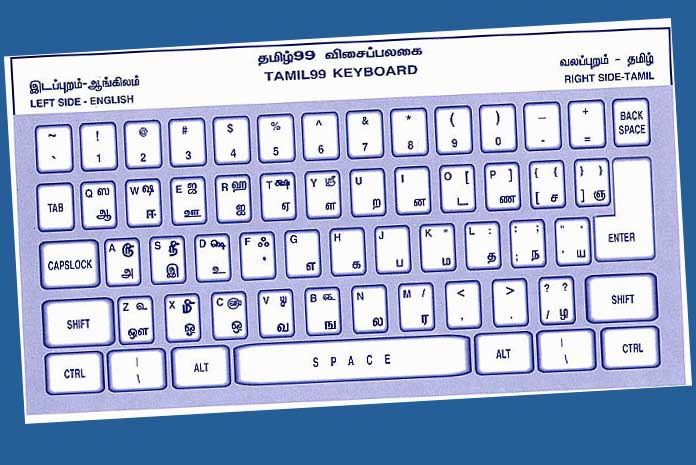

As part of its efforts to make technology accessible and productive for all, Microsoft has announced the addition of Tamil 99 – the popular Tamil language virtual keyboard – to Windows 10 PCs as part of the latest Windows update. The new feature works with both hardware as well as touch keyboards providing the convenient option for Tamil text input.
While the Tamil keyboard based on InScript standard has been available on various Windows since 2010, the Tamil 99 keyboard adds to the number of choices available to Windows 10 users.
Standardized and approved by the Tamil Nadu government in 1999, the Tamil 99 keyboard layout was created to help Tamil users type in a faster and simpler manner. It is now available on Windows 10 to users of both Tamil (India) and Tamil (Sri Lanka) languages, thereby assisting the wide base of Tamil users in India and other countries such as Sri Lanka, Malaysia, Singapore, South Africa and Mauritius.


Speaking on this, Meetul Patel, COO, Microsoft India, said, “Microsoft is focused on empowering everyone by breaking down all language related barriers in technology. It has always been our endeavour to provide users computing in local languages and enable them to be more productive. We are committed to supporting the national standards for Indian language technologies including the InScript keyboard layouts and adding the Tamil 99 keyboard is another significant step to making computing more accessible to a large number of users.”
Tamil computing is an important focus area for Microsoft Bhasha, an initiative started in the year 1998 to simplify computing in Indian languages. Apart from the two keyboard options, Input Method Editors (IMEs) for Tamil – including the popular Indic Language Input Tool (ILIT) – are also available on Microsoft’s Indic language community website bhashaindia.com. Microsoft has been closely working with the Kani Tamizh Parvai (Tamil Virtual Academy), a state government body, to understand the needs of common Tamil language users and strengthen its efforts to provide them with a quality computing experience.
InScript (Indian Script) is the official Indian keyboard standard approved by the Government of India in 1986. It provides a near identical text input experience on digital devices, across 12 Indian scripts including Tamil.
The Tamil 99 Keyboard layout was standardized in 1999 and approved by Tamil Nadu government. Designed for use with a normal QWERTY keyboard, it follows a consonant-vowel pattern. The arrangement of the characters allows for fast and simple typing.
How to install Tamil 99 keyboard on Windows 10
Tamil users who have not upgraded to the latest Windows update can:
- Go to Windows Settings>Update & Security>Windows Update
- Select the Upgrade option to install the latest upgrade
- Go to Windows Settings>Time & Language>Region & Language>Add a language
- Add the Tamil language to the PC
- Select the desired keyboard from the options available
For users adding the Tamil language to their operating systems for the first time, Tamil 99 is added as the default Tamil keyboard.


